
Put AI in your pocket.
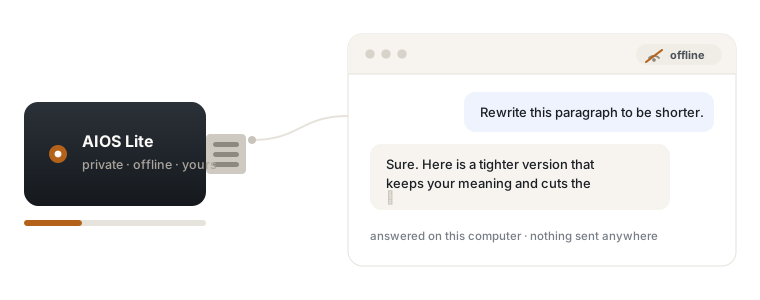
Run a private AI assistant straight from a USB drive. It works on any Windows computer, with the network switched off, and nothing you type ever leaves the machine in front of you.
The models underneath are open source and free — we'll show you exactly how to build this yourself. What we sell is the part that takes an afternoon to get right.
30-day money-back guarantee, no questions asked.
Can you really run AI from a USB stick?
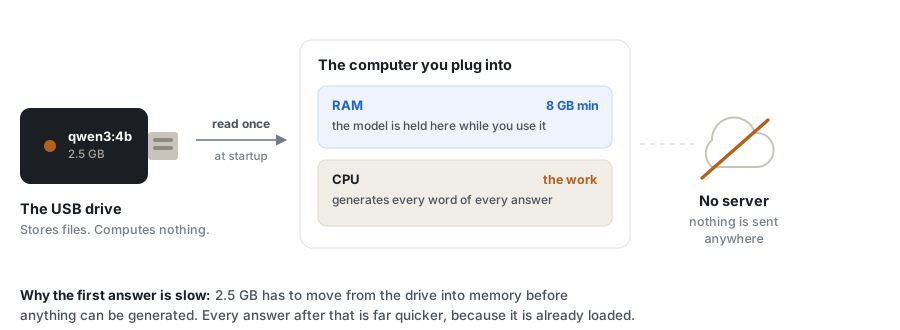
Yes. A quantised language model of two to four gigabytes fits on an ordinary 8 GB drive alongside the software that runs it. The drive supplies the files; the computer you plug into does the thinking, loading the model into its RAM. Once it's loaded you can unplug the network entirely and keep talking.
The drive carries the files
A model file and a small runtime. No installation on the host computer, and nothing left behind on it when you unplug.
The computer does the work
The model is read into RAM and runs on the CPU, or the graphics card if there is a capable one. This is why the host machine's memory matters more than the size of the drive.
Nothing is transmitted
There is no API call and no account. Your questions are answered by a program running on the desk in front of you.
What you actually need
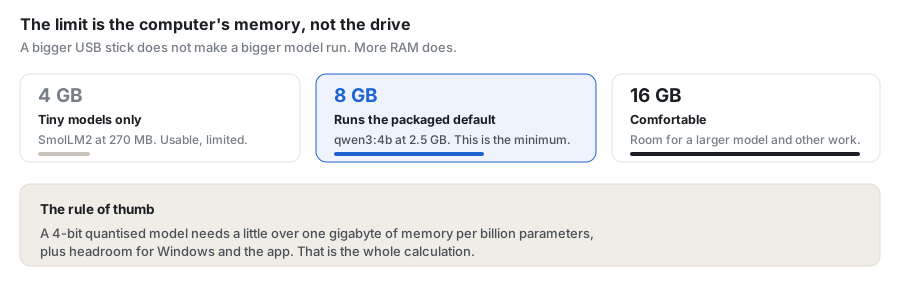
Honest numbers rather than marketing ones. The limiting factor is almost never the drive — it's how much RAM the host computer has.
| Drive size | What fits | Host RAM needed | What it feels like |
|---|---|---|---|
| 8–16 GB | One small model, around 2 GB | 8 GB | Quick, capable for everyday writing, questions and summarising |
| 32 GB | A larger model, or two smaller ones | 16 GB | Noticeably better reasoning and longer context |
| 64 GB | Several models plus voice and tools | 16–32 GB | Pick a model per task rather than compromising |
| 128 GB+ | A full portable environment | 32 GB+ | Closer to a desktop setup you can carry |
A USB 3.0 or faster drive matters more than capacity — it only affects how long the model takes to load, not how fast it answers once running. A slow USB 2.0 stick will work, but you'll wait longer at startup.
Or let us do the fiddly part
Everything on this page can be assembled free, and our guide shows you how. AIOS Lite is the same thing already put together, tested, and wrapped in something you can double-click.
$9.99 is the founders price. It goes to $15.99 when the founders period ends — if you buy at $9.99, that is your price, and the yearly renewal stays at $9.99 for as long as you keep it.
- A launcher that just works — no command prompt, ever
- A real interface, not a developer demo
- Hardware detection so it picks settings that suit your machine
- Jeffy, a default assistant, configured and ready
- Updates and improvements while your membership is active
- Part of the Private AIOS ecosystem, not a dead end
30-day money-back guarantee. Nothing to lose.
Questions people actually ask
Direct answers, including the ones that cost us a sale.
Can AI run from a USB drive?
Yes. A quantised model of around 2–4 GB fits comfortably on an 8 GB drive with the runtime beside it. The file is read from the drive into the host computer's RAM, so the drive stores and the computer thinks.
Does it need an internet connection?
No. Once the model is on the drive, conversations happen entirely on the computer in front of you. Turn off wifi and it carries on working — that's the whole point.
What size USB drive do I need?
8 GB is enough for one small model and the software. 32 GB gives room for something more capable. Beyond that you're carrying several models. Capacity is rarely the constraint — the host computer's RAM usually is.
How much RAM do I need for a local LLM?
Roughly one gigabyte per billion parameters at 4-bit quantisation, plus headroom. A 3-billion-parameter model is comfortable on 8 GB of RAM, and pleasant on 16 GB. Below 8 GB you're limited to very small models.
Can ChatGPT run from a USB drive?
No. ChatGPT is a hosted service that runs only on OpenAI's servers, and we're not affiliated with them. What runs from a USB drive is an open-weight model such as Qwen, made by a different company and downloadable by anyone. On a small drive it will be less capable than a large hosted model — that's an honest trade for privacy and no monthly bill.
Is it genuinely private?
The conversation is: nothing you type is sent to a server, because there is no server. Two honest caveats. The computer you plug into could have its own monitoring software, which is outside our control. And an unencrypted drive that gets lost exposes whatever is stored on it — so encrypt it if it will hold anything sensitive.
Do I have to pay you?
No, and we'd rather tell you that plainly. The models and runtimes are open source and free. Our free guide walks through the whole build. What $9.99 buys is the packaging — a tested launcher, a real interface, hardware detection and updates — so you don't spend an afternoon on it.
What exactly am I paying for, then?
Convenience and maintenance. We didn't create the underlying model and we don't claim to. We assembled, tested and packaged it, built the interface and launcher, and we keep it working as models and Windows change.